
Using GOBI
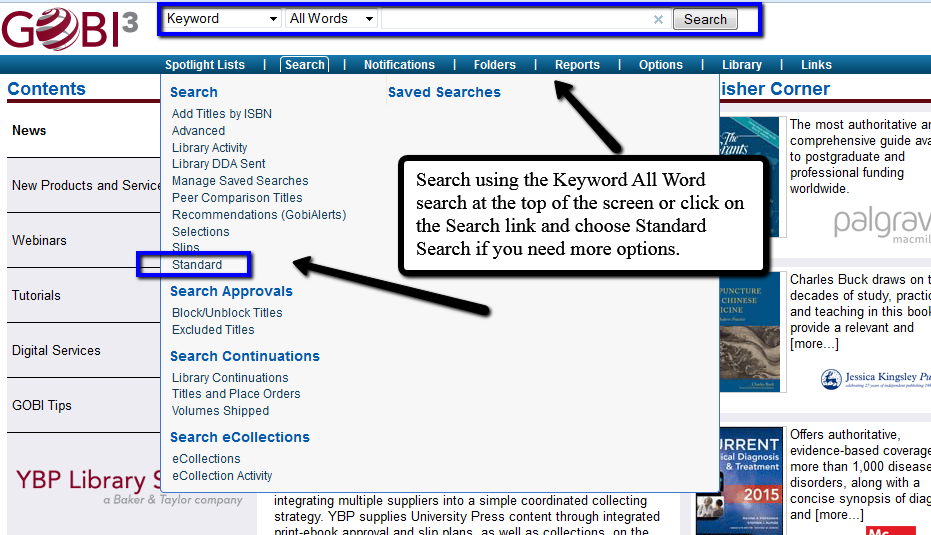
Search GOBI
Using GOBI
Go to www.gobi3.com. Login with your Rider email and your GOBI password. Each librarian should have his or her own GOBI username and password.

Because users have their own accounts they can create their own personal lists of titles for whatever purpose they wish. The main purpose, of course, is to select books for purchase for the library.
We recommend that you look at the GOBI Tutorials listed on the left side of the opening screen. Rider users do not have access to all functions in GOBI.
Mac users should use Mozilla Firefox rather than Safari. Request functions will not work in Safari.
Searching the database
There are two ways to search the database. Quick Search which always appears at the top of the screen and the Standard Search which is available under the Search menu item at the top of the screen. Quick Search should be adequate for most of your searches. It is a true keyword search. You can search terms from any field, including ISBN, but you can’t search two different fields at once (e.g., author/title combination). You need to use the Standard Search for that. An additional method for searching is to use the Add Titles by ISBN under the Search menu. This method allows you to enter a list of ISBNs, set your Subaccount, Fund code, and Initials and search them in batch.
Logging into GOBI
Go to www.gobi3.com. Login with your Rider email and your GOBI password. Each librarian should have his or her own GOBI username and password.